 Proofmark
Get feedback pinned to your new theme before you publish
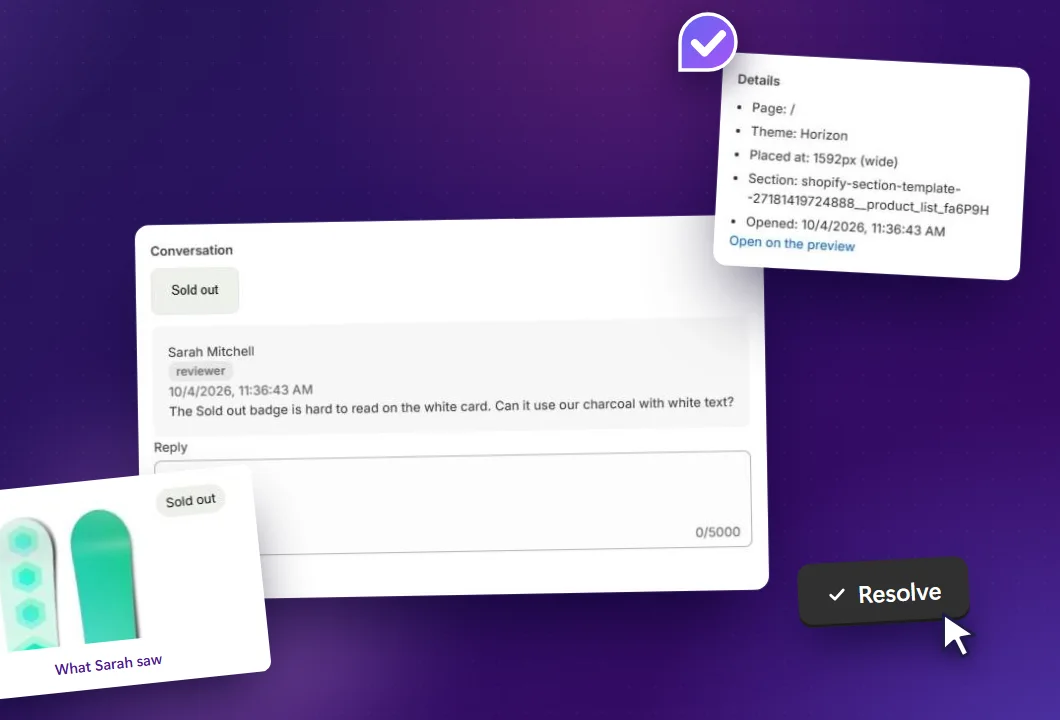
Building or redesigning your own Shopify store? Invite your business partner, your team, a freelancer or a few trusted customers to the unpublished theme. They click anything on it to leave a comment, with a screenshot attached. You reply and resolve each one in your Shopify admin.
Free plan · Store staff never count as reviewers · Billed through Shopify
Feedback on a new theme usually arrives in pieces
You ask a few people to look over the new store. What comes back is hard to act on.
Screenshots in WhatsApp
A cropped image with no page address, and no way to tell if it was taken on a phone or a laptop.
Preview links that expire
Shopify's shareable preview links stop working 2 days after you create them. Send one on Friday and it's dead by Monday.
Notes in five places
Your partner replies by email, your designer in chat, a friend by voice note. You copy it into a list and still miss one.
How it works
Proofmark runs on the theme you haven't published yet. Your live store doesn't change.
-
Switch it on for the new theme
Install Proofmark from the Shopify App Store, then switch on its app embed for the unpublished theme in the theme editor. Nothing is pasted into your theme code.
-
Invite the people you trust
Add their email addresses. Each person gets a sign-in link that opens the preview. No account, no browser extension, and no preview link for you to resend.
-
They click, you resolve
Reviewers click any element to leave a comment, and a screenshot is captured automatically. You reply and resolve each one in your Shopify admin.
Who to invite, and what it costs
Your store staff are always free. Reviewer seats are only for people outside the store.
Your team
Staff open Proofmark from the Shopify admin to start commenting, and they never count towards the reviewer limit. A team can review the new theme on the Free plan at no cost.
A partner, a freelancer or a friend
People without a staff account are reviewers. The Free plan includes 2, which covers a business partner and the designer who built the theme, or two friends with a good eye.
A few trusted customers
Regular customers notice what's missing from a product page. If you want more than 2 outside reviewers, Pro includes 10.
Made for a store that isn't finished
Most stores in development sit behind a password, and the live theme has to stay untouched. Proofmark works around both.
Password-protected stores
Save the storefront password in Proofmark's settings and it goes into the invite. Reviewers enter it once, and Proofmark walks them through that step.
Never on your live theme
Proofmark is a theme app embed whose script isn't served on the published theme. Shoppers never load it.
Closes when you publish
When you publish the theme you were reviewing, commenting closes and its threads are archived. There's no code to clean up.
Pricing
Per store, on your Shopify bill. Store staff are always free and never count as reviewers.
Free
$0
For one new theme
- 1 preview theme in review
- 2 outside reviewers
- Pinned comments with screenshots
- Reply and resolve from your admin
Pro
$19 / month
7-day free trial
- 3 preview themes in review
- 10 outside reviewers
- Pinned comments with screenshots
- Reply and resolve from your admin
Unlimited
$39 / month
For several themes at once
- Unlimited preview themes
- Unlimited outside reviewers
- Pinned comments with screenshots
- Reply and resolve from your admin
All prices in USD, billed every 30 days through your Shopify invoice.
Questions store owners ask
Do the people I invite need a Shopify account or a browser extension?
No. Each reviewer gets a single-use sign-in link by email that opens the preview theme. There's no account to create, nothing to install and no access to your Shopify admin. They stay signed in for 30 days on that browser.
Does it work while my store is password protected?
Yes. Save the storefront password in Proofmark's settings and it's included in the invite email. Reviewers enter it once on the store's password page, and Proofmark shows them that step before the preview opens.
Will shoppers see it on my live store?
No. Proofmark is a theme app embed, and its script isn't served on the published theme at all. Nothing is pasted into your theme code.
What happens when I publish the new theme?
Commenting closes as soon as the theme is published, and its threads are archived. Proofmark only runs on unpublished themes.
Who counts as a reviewer?
Reviewers are the outside people you invite, such as a freelancer, a friend or a customer. Your store staff are always free and don't count towards the limit. Plans are per store and billed through Shopify.
What if someone I didn't invite opens the preview?
They can ask for access from the preview, and you approve them.
Which themes does it work with?
Any theme that supports app embeds, including Dawn, Horizon and other Online Store 2.0 themes, and custom themes built on them. You switch it on for an unpublished theme in the theme editor under App embeds.
Getting ready to launch? Read how to preview a Shopify theme before publishing and how to get feedback on a new Shopify theme.
Publish with fewer surprises
Install Proofmark on the store you're building, invite the people whose opinion matters, and fix what they find before your customers see it.