 Proofmark
Proofmark / Guides
How to share a Shopify theme preview with a client
Short answer: in your Shopify admin go to Online Store, click the ⋯ actions menu on the theme, choose Preview, then click the share button in the preview bar to copy the link. Anyone can open it without logging in, but it expires 2 days after you create it.
Share a preview link, step by step
The theme doesn't need to be published. You can share any theme in your theme library, which is exactly what you want before a launch or a redesign.
- From your Shopify admin, go to Online Store.
- Find the theme you want reviewed, click the ⋯ button to open its actions menu, then click Preview.
- Optional: pick a different country or language in the preview bar if the client should see a particular market.
- Click the share (link) button in the preview bar. The link is copied to your clipboard.
- Send the link to your client.
You can create as many links as you like. Making a new one doesn't break the ones you've already sent.
The two kinds of Shopify preview link
Shopify's Help Center describes two kinds of theme preview, and they behave very differently:
| Visitor preview | Merchant preview | |
|---|---|---|
| How you get it | The share button in the preview bar | The address in your browser when you click Preview |
| Address | …shopifypreview.com | Your store's domain with a token |
| Who can open it | Anyone with the link | Only people logged in to your admin |
| Checkout | No | Yes |
| Expires | 2 days after it's created | 30 days after it's created |
For a client, you want the visitor preview: they don't need an account. The catch is the 2-day limit. If they open the link on Monday that you sent on Friday, it has already expired. We cover that in how long Shopify preview links last.
Common problems, and how to fix them
"The link has expired"
Visitor links last 2 days and there's no setting to make them last longer. Generate a fresh one from the preview bar and send it again. Older guides and forum answers that say 14 days are out of date.
You want to share the live theme
Shopify doesn't let you share a preview of your published theme. Duplicate it instead (⋯ > Duplicate on the theme), make your changes on the copy, and share a preview of that.
The client sees the live theme instead of the preview
Shopify's Help Center says that when a preview of an unpublished theme redirects to the live theme, it's almost always Cloudflare caching in front of the store. If your store's domain runs through Cloudflare, check its caching rules.
The store is password protected
Most stores in development are in private mode, behind a storefront password. If your client lands on the password page, send them the password with the link. You'll find it under Online Store > Preferences in your admin.
The client wants to test checkout
Visitor previews can't reach checkout. Only merchant previews can, and those need someone logged in to your Shopify admin, so checkout testing usually happens with a staff or collaborator account.
Sharing a preview from Shopify CLI
If you build themes locally, shopify theme share uploads your local theme to the store as a new unpublished theme and gives you a preview link to send. It's handy for quick reviews of work in progress, but it's a new theme each time, so clean them up afterwards: a store can hold a limited number of themes.
Collecting the client's feedback
Getting the link to the client is the easy part. The hard part is what comes back: notes by email, Slack and voice memo, screenshots with no page or device, and "the button at the top" with no way to know which one.
If you're collecting feedback by email, ask clients to include three things in every note:
- The page, as a link, not a description.
- The device: desktop or phone, and which browser.
- A screenshot with the element circled.
Then keep it in one thread per round, and number the points so you can reply to each.
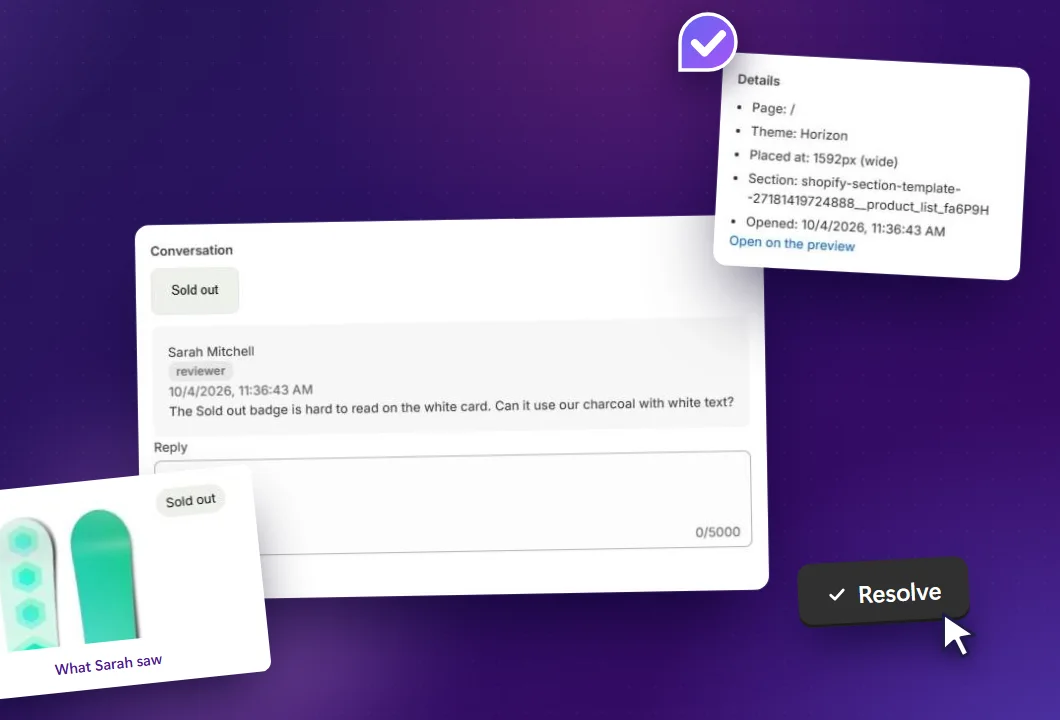
Or let the preview collect it for you. Proofmark is a Shopify app that puts a comment tool on your unpublished theme. You invite the client by email, their sign-in link opens the preview theme directly, and they click any element to leave a comment. Each comment captures a screenshot and records the page, theme and screen width, and you reply and resolve it from your Shopify admin. It doesn't use Shopify's 2-day share links, and clients stay signed in for 30 days.
Get feedback pinned to the theme, not buried in email
Free for one theme and two client reviewers. No client accounts or browser extensions.
Add Proofmark to Shopify, free